Showing posts with label Hack Your Friend. Show all posts
Showing posts with label Hack Your Friend. Show all posts
Tuesday, 26 June 2012
This is a tutorial about how you can reset the password if you forget or registered the password unfortunately on your computer and also used to crack and to change the password of your friends pc.
Requirements:
1. Any Accessible Computer.
2.USB Drive or CD/DVD
Step 1: Install Password Killer
Download the Windows Windows Password Killer from Here
Install the windows Password Killer in your friends or any accessible computer.

Step 2:Burn a bootable CD/DVD or an USB drive
Insert the USB Drive or CD/DVD.
Run the Windows Password Killer.
Select the USB drive or CD/DVD.
click the Create button.
It will ask you to verify whether you select correct disk or not. Click "Yes" button.
Step 3: Boot from USB Drive OR CD/DVD
Now let us come to our locked computer.
Insert your USB Drive before turn on the system(if you are using CD/DVD, you have to turn on and insert).
Now turn on the system, press F10 or F12(it may vary for your system) to choose the booting device.
Select the USB drive or CD/DVD.
It will boot into Windows Password Killer.
Step4 : Reseting Password
After program starts, select Windows 7 system on the start page, click 'Next'.

Select your target user accounts, and then click 'Next' to proceed the Windows 7 password recovery/unlock process.

The Windows 7 Administrator password or other user accounts password is reset successfully now. Take out the password reset CD/DVD, click 'Reboot' to restart your computer.

Hope You like! If you do pls like our page Facebook. And pls do comment!!
Requirements:
1. Any Accessible Computer.
2.USB Drive or CD/DVD
Step 1: Install Password Killer
Download the Windows Windows Password Killer from Here
Install the windows Password Killer in your friends or any accessible computer.
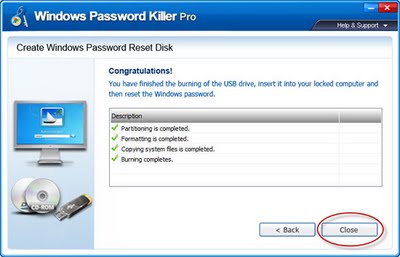
Step 2:Burn a bootable CD/DVD or an USB drive
Insert the USB Drive or CD/DVD.
Run the Windows Password Killer.
Select the USB drive or CD/DVD.
click the Create button.
It will ask you to verify whether you select correct disk or not. Click "Yes" button.
Step 3: Boot from USB Drive OR CD/DVD
Now let us come to our locked computer.
Insert your USB Drive before turn on the system(if you are using CD/DVD, you have to turn on and insert).
Now turn on the system, press F10 or F12(it may vary for your system) to choose the booting device.
Select the USB drive or CD/DVD.
It will boot into Windows Password Killer.
Step4 : Reseting Password
After program starts, select Windows 7 system on the start page, click 'Next'.

Select your target user accounts, and then click 'Next' to proceed the Windows 7 password recovery/unlock process.

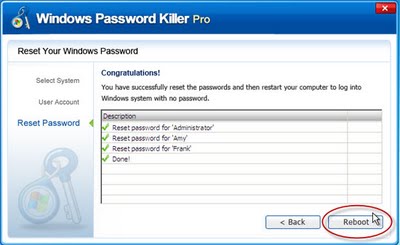
The Windows 7 Administrator password or other user accounts password is reset successfully now. Take out the password reset CD/DVD, click 'Reboot' to restart your computer.
Hope You like! If you do pls like our page Facebook. And pls do comment!!
Tuesday, 26 June 2012 0
Wednesday, 20 June 2012

Key-loggers or keystroke loggers are programs that can log keystrokes and save them as log files or send them via emails or ftp to the person who has installed key-logger. It can record date and time of application which was opened and capture what was typed in it may it be notepad, wordpad, MS word or any website URL, user name, password
in your web browser. It can also distinguish between other keys pressed other than character keys including ctrl, alt, enter, win etc.
If you install keystroke logger in victim's PC you will not only get his/her user name and password of facebook account but username and password of every site he/she visits from that computer.
Wednesday, 20 June 2012 0
Friday, 8 June 2012
Step 1: Before going to start clear all history, all cookies, stop all downloading and close all extra tabs. Mean to say stop all internet activities. Now go to your messenger and start chating with the victim.
Step 2: Go the start and click on run.
Step 3: In run command type cmd.exe and hit enter.

Step 4: A black screen will appear. This is command prompt. In this box type "netstat -n" (without quotes).
Step 5: Now if you done the step one correctly you see only one ip address many times (ip should be of victim).
Step 6: Now again, type "shutdown -i"(without quotes).A box will appear now click on add button.A small box will pop up. Now type ip address of computer which you get from "netstat -n" command.
Step 7: Now there are three options click on shutdown.
Step 8: To show a message to victim's computer check the "warm users of the action" and set the number of seconds.
Step 9: Now select any option in shutdown event tracker.
Step 10: Now comes the best part of the prank. In last type your message like you got hacked and we destroy your computer. After this shutdown your computer is not going to start(type anything that scare your victim). Now click on ok and you are done.
Hope You Like It! Join Us On FACEBOOK For More Updates!!!
Friday, 8 June 2012 2
Tuesday, 22 May 2012
Remember Password I:
While login to your account in Mozilla,there will be option named as "remember password " . If you selecting that option, soon you may loose your account. (if you are using in internet cafe,certainly you will loose). Those password can be view by hackers which is stored in cookies(may be plain text or encrypted form).
Remember Password II:
After you click Login button mozilla will pop up with "remember password","never to this site","not now " option. If you are selecting "remember Password" option, certainly you will loose your account. Because when you click that option,mozilla will store the password as plain text. So it is not big deal to hack your account. Hackers can see easily your password.
Do you want to know how to see those saved passwords? Then Read my article on
While login to your account in Mozilla,there will be option named as "remember password " . If you selecting that option, soon you may loose your account. (if you are using in internet cafe,certainly you will loose). Those password can be view by hackers which is stored in cookies(may be plain text or encrypted form).
Remember Password II:
After you click Login button mozilla will pop up with "remember password","never to this site","not now " option. If you are selecting "remember Password" option, certainly you will loose your account. Because when you click that option,mozilla will store the password as plain text. So it is not big deal to hack your account. Hackers can see easily your password.
Do you want to know how to see those saved passwords? Then Read my article on
Tuesday, 22 May 2012 0
Saturday, 19 May 2012
Whenever you log in to a website using your username and password, you'll be prompted by Firefox whether you'd like Firefox to remember this password.

If you click on Remember, the next time you visit the website, it'll automatically enter the username and password for your convenience.
Now, back to the topic. Let's say you saved your GMail password in Firefox. After months or years gone by and you don't remember the password you set for my GMail. You started to panic and desperately need to get back your GMail password.
Don't worry, here's how you can find the hidden GMail password in Firefox.
Firefox is much better than Internet Explorer in terms of managing "remembered" logins. In Internet Explorer, there is no built-in feature where you can manage or view your saved login information. That's why you need third party tools to reveal the passwords hidden under asterisks. As for Firefox, you can access remembered passwords with a few clicks.

To view your remembered passwords in Firefox browser, go to Tools, and click on Options. Go to Security tab and click on the Show Passwords button. A remember password dialog box will appear. Click on the Show Passwords button again and a new column with password will appear.
If you click on Remember, the next time you visit the website, it'll automatically enter the username and password for your convenience.
Now, back to the topic. Let's say you saved your GMail password in Firefox. After months or years gone by and you don't remember the password you set for my GMail. You started to panic and desperately need to get back your GMail password.
Don't worry, here's how you can find the hidden GMail password in Firefox.
Firefox is much better than Internet Explorer in terms of managing "remembered" logins. In Internet Explorer, there is no built-in feature where you can manage or view your saved login information. That's why you need third party tools to reveal the passwords hidden under asterisks. As for Firefox, you can access remembered passwords with a few clicks.
To view your remembered passwords in Firefox browser, go to Tools, and click on Options. Go to Security tab and click on the Show Passwords button. A remember password dialog box will appear. Click on the Show Passwords button again and a new column with password will appear.
Saturday, 19 May 2012 0
Subscribe to:
Posts (Atom)


